
Netfix Video Downloader
Save Netflix Movies to HD MP4 Offine


Netfix Video Downloader
Save Netflix Movies to HD MP4 Offine

YouTube Video Downloader
Download YouTube MP4 up to 4K/8K

TikTok Video Downloader
Download TikTok videos to MP4 1080P

OnlyFans Video Downloader
Download videos from OnlyFans HD
 By Iris Holmes
 Updated on Oct 13, 2025
 26.3K views
 5min read
Amazon Prime Video is the go-to platform for many to stream movies and TV shows. However, its official downloading feature comes with limitations. All downloads are only playable on the official app and expire after a limited period. This is why so many people are looking for how to rip Amazon Prime videos for flexible offline use across various devices.
So what should you do then? Keep reading! This article will guide you through 3 effective ways to rip videos from Amazon Prime on PC and phones, letting you enjoy them more freely offline. Let’s scroll down now and discover the best way!
To put it simply, you can extract downloaded Amazon Prime files, but you can’t do anything with them – let alone play or edit them.
Streaming Amazon Prime videos are applied with DRM encryption technology, even though you have subscribed to its plans, you can only watch the downloads on its app with some limitations, such as:
But still, there are some ways to rip Amazon videos to common playable video files directly. For example:
1. Use a third-party Amazon Prime Video ripper: Choose a reliable ripper, such as VideOne Amazon Downloader. It can bypass DRM restrictions, and convert Amazon Prime videos into MP4, MKV, and MOV in HD quality. This makes it possible to enjoy your favorite Amazon movies on TV or other big screens for a more immersive watching experience.
2. Use screen recording software: Recording the playing video on your screen directly can be a feasible solution to rip Amazon Prime videos on PC. This method is relatively simple, but the recording process may be interrupted and can be limited by computer performance.
3. Use an Amazon Prime Video ripper app: For those who prefer to watch Amazon Prime videos on mobile phones, this method is ideal. Keep in mind, though, this kind of app is not as stable and reliable as desktop tools.
If you are unsure where to start, read on. We will walk you through how to rip Amazon videos step by step with all methods.
When it comes to the most efficient and high-quality way to rip Amazon Prime videos, VideOne Amazon Downloader stands out as the optimal solution. With its simple and user-friendly interface, you can easily rip your favorite movies, TV shows, and originals from Amazon Prime while bypassing DRM encryption with just a few clicks.
Moreover, unlike screen recorders, this tool can directly convert Amazon Prime videos to Full HD MP4, MKV, and MOV files with original subtitles in one go. Whether you are saving Amazon movies for a long flight or transferring them to a USB drive, VideOne makes offline watching effortless, even if your subscription expires.
Key Features of VideOne Amazon Downloader
Ready to get started? Follow the steps below to learn how to rip Amazon videos to MP4 using VideOne in minutes.
Launch Amazon Prime Video Downloader on your Windows or Mac computer. Then, select an Amazon website you use and sign in with your Amazon Prime or Unlimited account.
We will take Windows as an example. If you are using macOS and prefer a detailed guide, you can read this: How to Download Amazon Prime Videos to MacBook/iMac
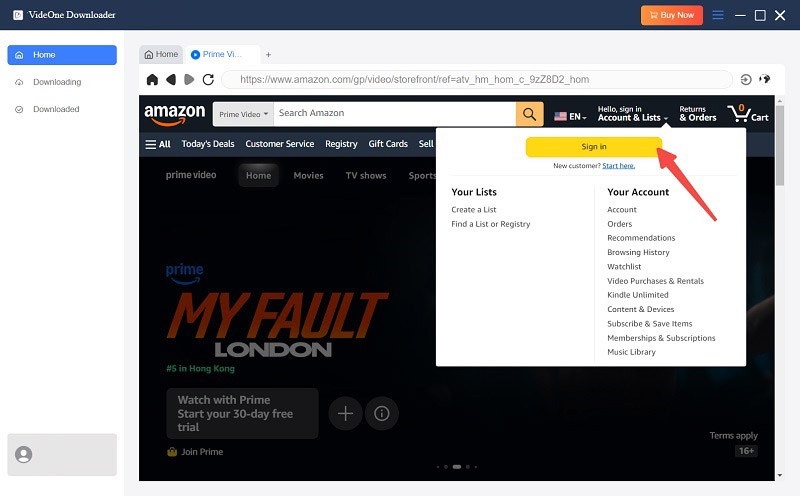
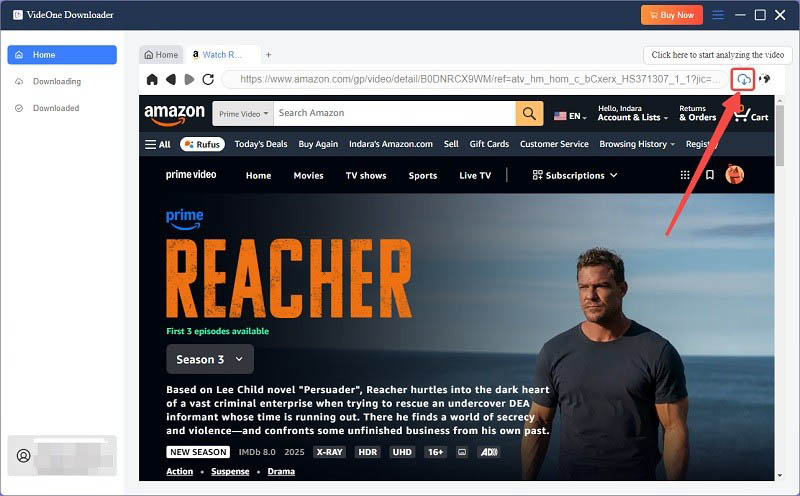
Search for your favorite movie, original, or TV show from Amazon Prime with keywords on the web player, then click on the download button on the right side of the address bar.
If you have purchased or rented Amazon movies without an Amazon Prime membership, you can also add them to queue to get them ripped.
In the pop-up window, you can easily click the menu to choose to rip Amazon videos in MP4, MKV, or MOV format for unlimited playback on your device. For the best output, you can also customize the output quality, audio/subtitle language, output path, and more based on your needs.
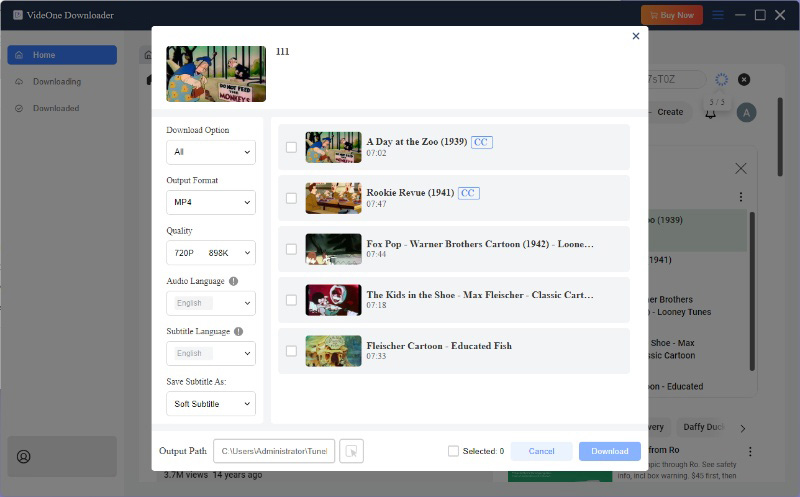
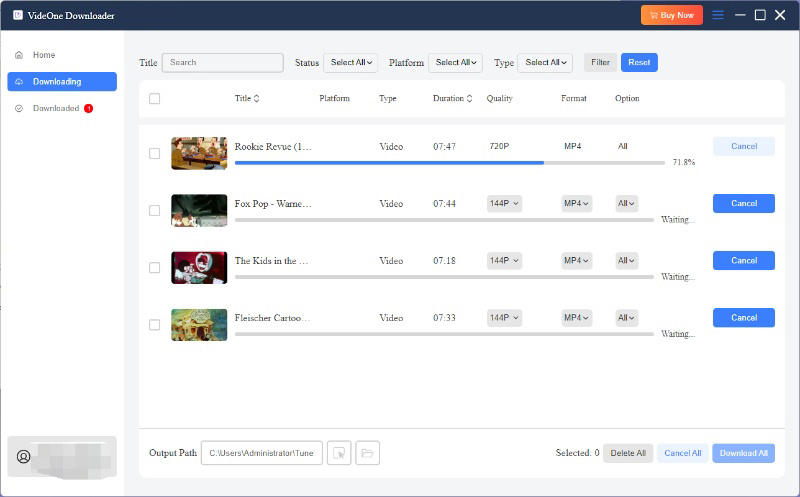
Simply select the videos in the list, then click on “Download” to rip videos from Amazon Prime to your local storage. After that, you can head to “Downloaded” and click “View Output File” to locate all your downloads. Now, you can watch these Amazon videos on VLC or any media player without any hassle.
In addition to using a Prime Video ripper, another viable solution is to directly record the screen while playing them. However, not all screen recorders work with Amazon Prime Video, especially the default one on Windows or Mac. Many users have reported encountering black screens or distorted playback due to DRM protection.
To successfully rip Amazon video via recording, you need powerful software like FonePaw Screen Recorder that can often bypass these issues. It is worth noting that screen recording movies or TV shows can be time-consuming, so this method is more suitable for recording short video clips, instead of ripping whole episodes from Amazon Prime.
Tip. To rip Amazon Prime movies or a full season of a show, it is advisable to consider using the best Amazon video downloader, such as VideOne Amazon Downloader.
Here we will take FonePaw Screen Recorder as an example to guide you on how to rip an Amazon Prime video clip by recording:
Step 1. Open the video you want to rip.
Step 2. Download and install the recorder, then launch it.
Step 3. Go to “Video Recorder” and select the recording area with the “Custom” option.
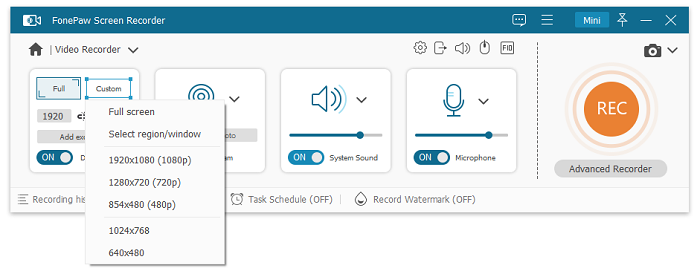
Step 4. Hit “REC” and start playing the video. When the clip you want to rip is captured, stop the recording and save the video to your computer.
If you are looking to rip Amazon Prime videos directly on your phone or tablet, PlayOn Cloud is undoubtedly an easier solution. It can capture videos from multiple streaming platforms, including Amazon Prime Video, and automatically save the recordings as MP4 files.
However, this tool cannot save Amazon videos in MKV or other common formats. Plus, PlayOn can be more complex than other methods because it uses a credit system: You need to purchase and use 1 credit for SD (480p) and HD (720p) recordings, while Full HD (1080p) recordings cost three credits. Here are the specific steps.
Step 1. Get the PlayOn Cloud app from the App Store or Google Play on your iPhone or Android device. Then, sign up for a free account to get 7 free recording credits.
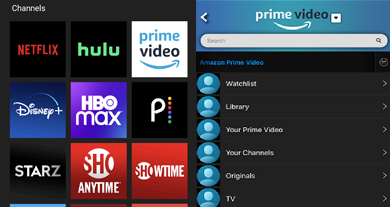
Step 2. Open the app and go to the “Channels” tab. From there, choose “Amazon Prime Video” and browse the available movies or TV shows you’d like to rip.
Step 3. Tap on the record icon. PlayOn will start recording and ripping Amazon video in the cloud.
Step 4. Once the recording is finished, go to the “Recordings” tab. You can then download the ripped Amazon Prime videos to your phone within 7 days.
By now, you’ve learned how to rip Amazon videos on PC and phone, along with 3 effective tools. If you’re still unsure which method is best for you, check out the comparison table below to help you decide.
| VideOne Amazon Downloader | FonePaw Screen Recorder | PlayOn Cloud | |
|---|---|---|---|
| Ripping Method | Downloading | Recording | Recording |
| Available on | Windows, Mac | Windows, Mac | Android, iOS |
| Ease of Use | High | Medium | Low |
| Speed | 3X faster than the original length | 1X | 1X |
| Output Format | Video: MP4, MKV, MOV Subtitles: SRT | MP4, MOV, WMV, F4V, MP3G-TS, WebM, GIF | MP4 |
| Output Quality | Up to 1080P | Up to 1080P | Up to 1080P |
| Pros | Easy to useFasterBest for long and multiple video downloads | Flexible ripping options for video quality and durationFaster ripping for shorter videos | Rip videos from Amazon Prime on Android & iOS.Enable automatic recording. |
| Cons | Cannot select specific segments to rip | Complicated processVideo and audio quality get compressedNot suitable for ripping long videos or movies | Complicated to get startedTime-consuming |
No. Amazon Prime Video imposes DRM protection on all content. If you try to rip Amazon Prime videos using your phone’s built-in screen recording function, you will end up with a black screen or no audio. Therefore, it is recommended to use a professional tool to download Amazon Prime videos to your SD card or iPhone/iPad.
Yes. All of the methods mentioned above can rip Amazon videos while removing DRM restrictions, saving them in MP4, MKV, or other common formats. This lets you keep your Amazon Prime videos permanently and transfer them to any device for flexible use.
Further reading:
It depends. Generally, if you only use ripped Amazon videos for personal offline viewing, backup, or educational purposes, it is unlikely to be considered copyright infringement. However, uploading videos to public platforms or distributing them for commercial purposes is illegal. Therefore, please always follow local laws and Amazon’s terms of use when using these Amazon Prime Video rippers.
After going through the comprehensive guide on how to rip Amazon Prime videos using downloaders, screen recorders, and mobile solutions, the choice is clear.
If you need a quick and convenient solution, VideOne Amazon Downloader can be the best option. With just a few clicks, you can rip videos from Amazon Prime to MP4, MOV, and MKV on your computer while preserving the original high-definition image quality. Let’s click the download button below today and start your first ripping!
Was this information helpful?