
Netfix Video Downloader
Save Netflix Movies to HD MP4 Offine


Netfix Video Downloader
Save Netflix Movies to HD MP4 Offine

YouTube Video Downloader
Download YouTube MP4 up to 4K/8K

TikTok Video Downloader
Download TikTok videos to MP4 1080P

OnlyFans Video Downloader
Download videos from OnlyFans HD
 By Tony Moton
 Updated on Sep 21, 2025
 23.3K views
 8-min read
OnlyFans has become one of the fastest-growing content platforms in recent years, offering exclusive photos and videos from creators. Many subscribers want to save their favorite videos for offline viewing, and tools like YT Saver are often the first option people try.
YT Saver is a popular multi-purpose video downloader that claims to support websites like YouTube, Instagram, TikTok, and even OnlyFans. However, more and more users are running into problems and searching online for “TY Saver not working for OnlyFans”.
If you’re one of them, this guide will walk you through why YT Saver fails on OnlyFans, the most common problems you might encounter, and practical fixes you can try right now. And if nothing works, we’ll also show you the best alternative for downloading OnlyFans content smoothly.

You May Also Like:
YT Saver is often introduced as an all-in-one video downloader that works with major platforms like YouTube, Instagram, TikTok, and Facebook. It allows users to save videos in multiple formats, choose between different resolutions, and even hide downloads in a private folder protected by a password.
Because of these features, many OnlyFans subscribers turn to YT Saver, hoping it will let them store exclusive videos for offline viewing. For users who want to back up message videos or download a creator’s full library, the promise of batch downloading also seems appealing.

Many users are surprised when YT Saver performs well on platforms like YouTube or TikTok but suddenly struggles with OnlyFans. The reasons aren’t always obvious, but they usually come down to a combination of technical barriers and software limitations. Let’s look at the main factors behind these failures.
OnlyFans invests heavily in protecting creators’ work through digital rights management (DRM). These protections are updated regularly, sometimes even without notice. When this happens, third-party downloaders like YT Saver can’t always adapt quickly enough. As a result, videos that once downloaded smoothly may suddenly fail, leaving users with endless “analyzing” screens or incomplete files.
Another factor lies in YT Saver OnlyFans Video Downloader itself. While updates are meant to improve compatibility, new releases can introduce bugs that accidentally break OnlyFans support. Some users even report that older versions of the tool worked better than newer ones. This inconsistency makes it hard to rely on YT Saver as a long-term solution.
Not every problem is the software’s fault. Sometimes a weak internet connection or a copied link with errors can trigger failed downloads. If the video doesn’t play smoothly in your browser, YT Saver won’t be able to process it either. These issues are less about DRM and more about everyday stability.
For those using YT Saver’s free or trial edition, restrictions are another roadblock. Limits on the number of downloads, maximum duration, or available formats can all make it seem like the tool simply isn’t working. Upgrading to the paid version may lift some of these limits, but it doesn’t solve the deeper compatibility issues with OnlyFans.
In many cases, the problems users face aren’t permanent and can be resolved with some basic adjustments. Here are the most common approaches that have helped others.
A weak internet connection or an expired OnlyFans session can often cause downloads to stall. Logging out and back in, or switching from Wi-Fi to a wired connection, can sometimes be all it takes to get things working again.
Outdated software is another common culprit. Make sure you’re running the latest version of YT Saver, as updates occasionally patch compatibility issues. If things still don’t improve, uninstalling and reinstalling the program can clear out corrupted files and reset settings that may be interfering with downloads.
Interestingly, some users report better results with older versions of YT Saver. If a recent update seems to have caused new issues, trying a previous build may temporarily restore functionality. It’s not a guaranteed fix, but it has worked for many.
Finally, always make sure the video plays correctly in your browser. If it’s blocked by region restrictions, set to private, or otherwise unavailable, YT Saver won’t be able to process it. Verifying the link in advance can save time and frustration.
Across different forums and reviews, OnlyFans subscribers often share similar complaints about YT Saver. The most common frustration is with DRM-protected and pay-per-view videos, which either fail to download or result in unplayable files. Others mention that promised features, such as 4K resolution or batch downloading, don’t really work in practice – downloads are capped at 1080p and multiple links still need to be added one by one. Another recurring issue is the lack of reliable support. When errors occur, users say it can take weeks to hear back from customer service, if they get a reply at all.
This shows that while quick fixes can help in some cases, they don’t address the deeper compatibility issues. For a long-term solution, many users eventually turn to a more reliable tool.
Since these problems continue to affect users even after trying all the common fixes, it’s clear that YT Saver isn’t a dependable option for OnlyFans. What subscribers really need is a downloader that can handle OnlyFans smoothly, and this is where VideOne OnlyFans Downloader comes in.
VideOne OnlyFans Downloader is a professional downloader for Windows and macOS that goes beyond just saving clips. It supports a wide range of video and audio formats, offers faster download speeds, and can handle DRM-protected streams that other tools struggle with. On top of that, it works with over a thousand sites including Netflix, Disney+, YouTube, TikTok, and Instagram, making it a versatile tool for both OTT platforms and creator content. Whether you want to save message videos, back up entire libraries in bulk, or keep your downloads private, VideOne provides a much smoother experience than YT Saver.
Key Features of VideOne OnlyFans Downloader:
Getting started with VideOne is quick and straightforward. Here’s how it works in just a few steps:
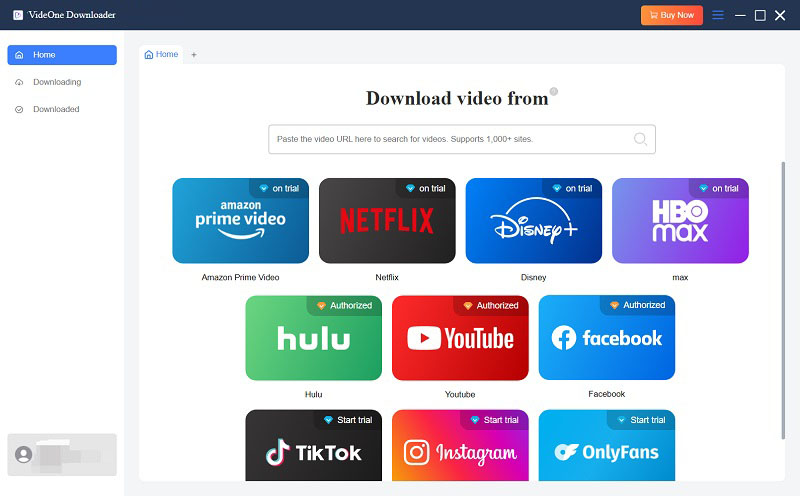
Step 1. Select OnlyFans as the Service
Launch VideOne OnlyFans Downloader and in the platform selection screen, choose “OnlyFans” from the available options.
Step 2. Log Into Your OnlyFans Account
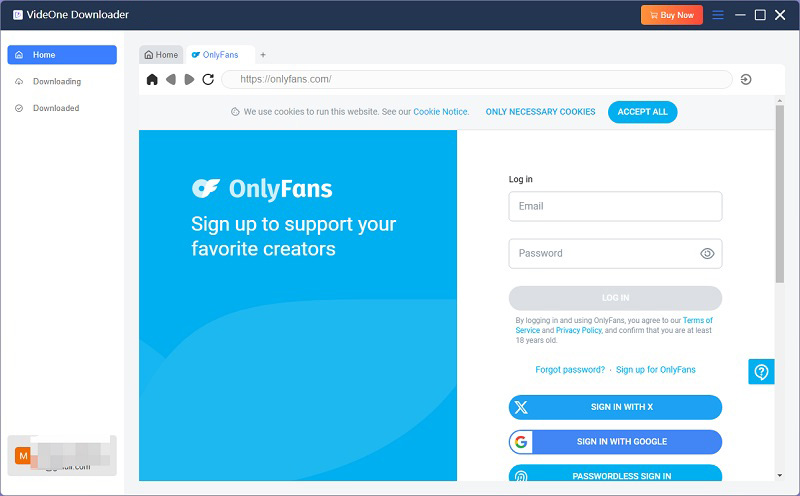
Click the “Log In” button inside VideOne, then enter your OnlyFans credentials through its built-in browser. This gives the software access to your available content.
Step 3. Add Videos to the Download List
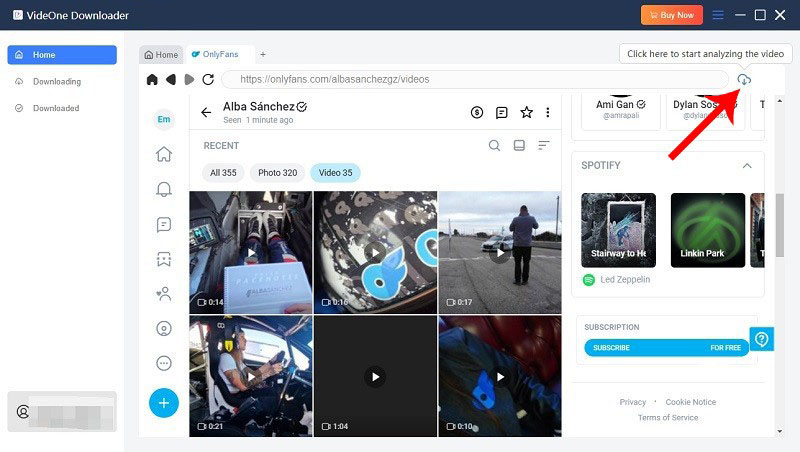
Navigate to the video you want, open the video page, then click the “Download” button that appears.
Step 4. Choose Output Format and Quality
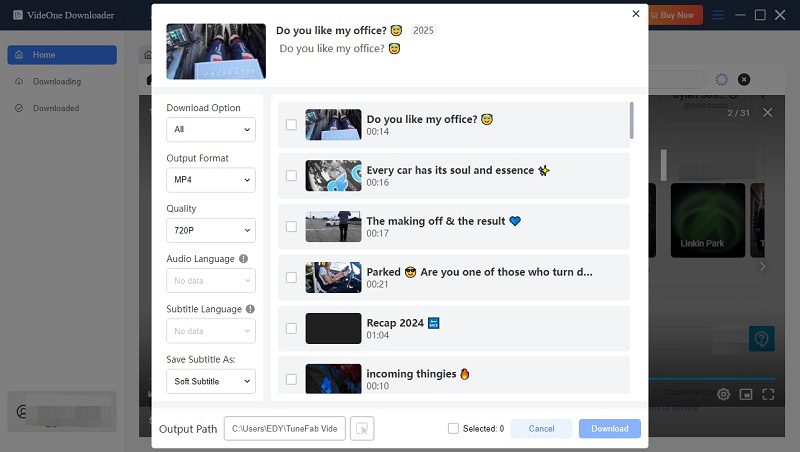
Once the video is parsed, a pop-up will allow you to select the desired format (MP4, MKV, or MOV) and video quality. Make your preferences here before starting the download.
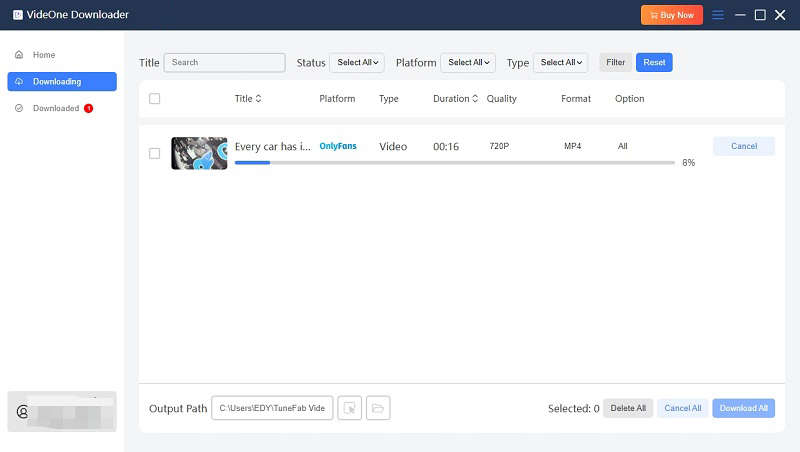
Step 5. Start the Download and Access Saved Files
After choosing format and quality, click “Download” to start downloading. When complete, go to the “Downloaded” section in VideOne to find your saved videos and use the “View Output File” option to access them.
This article has explained the common issues behind YT Saver not working for OnlyFans, from DRM restrictions to unstable updates, and offered practical fixes that may help in some situations. These tips can resolve temporary glitches, but they don’t solve the bigger compatibility problems users face with YT Saver.
For a more reliable and long-term solution, VideOne OnlyFans Downloader is the better choice. With simple operation, support for DRM and message videos, batch downloads, and private storage, it makes saving OnlyFans content smooth and secure, without the frustration YT Saver often brings.
Was this information helpful?